I practically run my life on Notion.
I know that sounds slightly dramatic. But you name it. Projects. Events. Work items. Sprint tickets. DSU notes. Writing. Personal admin. Notes from events I attend. Things I need to follow up on. Ideas I may or may not do anything with. Things I want to learn. Things I am deliberately not doing right now.
And then everyone started building their personal AI agents. I did too. One of the appeals was having the assistant somewhere immediately accessible, so Telegram became CurioBot’s first interface. It worked, but I quickly realised I had created another place I needed to remember to visit. Another chore.
Notion was already where I went every day. Naturally. So instead of moving my life to Curio, I made Curio work around what I already had in Notion.
Path of least resistance.
That was when Notion stopped being just a place where I organised notes and started becoming my Control Centre.
What the Control Centre actually is
It is not really a dashboard. It is not one giant Notion database trying to hold data from every part of my life to see everything in one place.
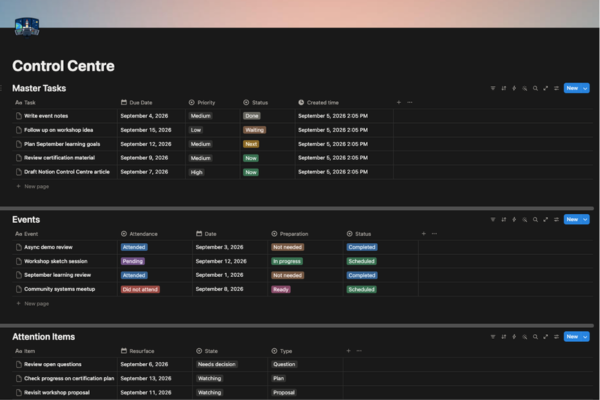
My setup has started working in almost the opposite direction. Notion is increasingly the backbone for several different systems. The data lives here, but I do not necessarily have to interact with it every time.
An event, for example, can be created from Telegram or directly in Notion. Notion holds the event record, and from there it can be published to Google Calendar. Preparation, attendance, notes and post-event notes triage all stay with the event in Notion as a single source of truth rather than being scattered across the calendar and other apps.
Check-ins work similarly. Curio queries the system to bring up priorities and notice avoidance patterns, but the check-in itself is driven by what is already in Notion: current priorities, stale items, preparation for upcoming events or things I have been repeatedly avoiding. The useful outcome and my decisions are stored back in the database.
Other systems use the same backbone in different ways:
-
Tasks link directly to actions. Some of them point me to the documents or drafts in progress; others bring me straight to the respective ChatGPT project or conversation. Those links can also be included in the reminders to allow me an easy entrypoint back to work.
-
Content Scout can use the interests, ideas and existing content stored in Notion as context for what it should look for, rather than discovering things in isolation.
-
Thoughts and content can connect directly. Something captured as a thought can later become part of an article rather than being copied between disconnected notes.
-
Blog publishing starts in Notion. Once an article is ready, the publishing pipeline takes it from there to the website.
So the important part of my Control Centre is not the page for looking at data. It is the structured layer that the rest of these workflows read from and write back to. That the databases happen to look good is just an added bonus.
One system to rule them all
Once Notion became the Control Centre, I needed one rule more than anything else: the system could not become another thing I had to manage. So I kept the architecture fairly simple.
Notion as the source of truth. Other tools can display, trigger or act on the data, but state is captured and maintained in the database as much as possible. Google Calendar is just a reflection of what is in here. Telegram check-ins still update the status here. A blog post is drafted and finalised here, with the publish workflow trigger just a button away before GitHub Actions takes care of the rest. External tools do their part, but the underlying record stays in one place.
External tools as entry points or outputs, not secondary sources. Telegram is useful because it is quick to access. Calendar app is useful because I’m used to the event reminders and the interface. My Github Pages-Jekyll website still belongs in its home. ChatGPT is where much of the brainstorming happens. But none of them are competing for my attention.
CurioBot as the operating layer. Notion holds state, but Curio acts on it. It can read across databases, surface what needs attention, update records, trigger the right workflow and carry context between otherwise separate parts of the system. A tri-weekly check-in delivered to Telegram, an event published to the calendar, or a scout identifying potential content material from the rest of my activities or thoughts may look like separate features, but Curio is the layer coordinating them around the same underlying data.
What this architecture means
-
One record stays alive throughout a workflow. I don’t need to copy bits of it everywhere. When I change the state of one thing, I don’t need to pass it along to five different tools. Tools may change around it, but the state doesn’t need to be recreated.
-
Workflows should remove steps, not add admin work. They should make things easier without turning the whole flow another unwelcome chore. The point is to reduce friction between knowing I need to do something and actually doing it.
-
The system is easy to extend. I could add a new interface or workflow without redesigning the existing system, as long as I am clear of this distinction between what data it needs, where it should live, and who should read, write or act on it.
What sits on top of it
The architecture is now doing enough work that I can keep adding small workflows around it without turning each one into its own system.
At the moment, that includes event management, recurring check-ins, task resurfacing, content discovery, thought-to-content links, study and certification preparation pipelines, and a publishing workflow from Notion to my blog. Some are driven by Curio, some by scripts and scheduled jobs, and some are purposefully manual.
Each of those could probably make a post of its own. For now, this architecture is what makes the rest possible.