One end-of-day logging habit to improve daily standups and reviews
If you’ve ever found yourself scrambling before a Monday morning standup, trying to remember what you did on Friday, you’re not alone.
Daily standups are meant to be quick and clear, but reconstructing updates at the last minute can make even simple progress hard to communicate, especially after a weekend. Important details slip through, blockers go unmentioned, and day-to-day accomplishments get forgotten.
To fix this, I use a daily project update tracker in Notion. It involves a simple button to generate a fresh entry for each day, and I spend a couple of minutes logging my updates at the end of the workday while everything’s still fresh. That’s it. By the time the next standup arrives, I already have a clear summary ready to go.
How the Tracker Works
I start with a new Notion page for every sprint. Depending on the project’s size or sprint length, I may create a new page per sprint or change it every quarter.
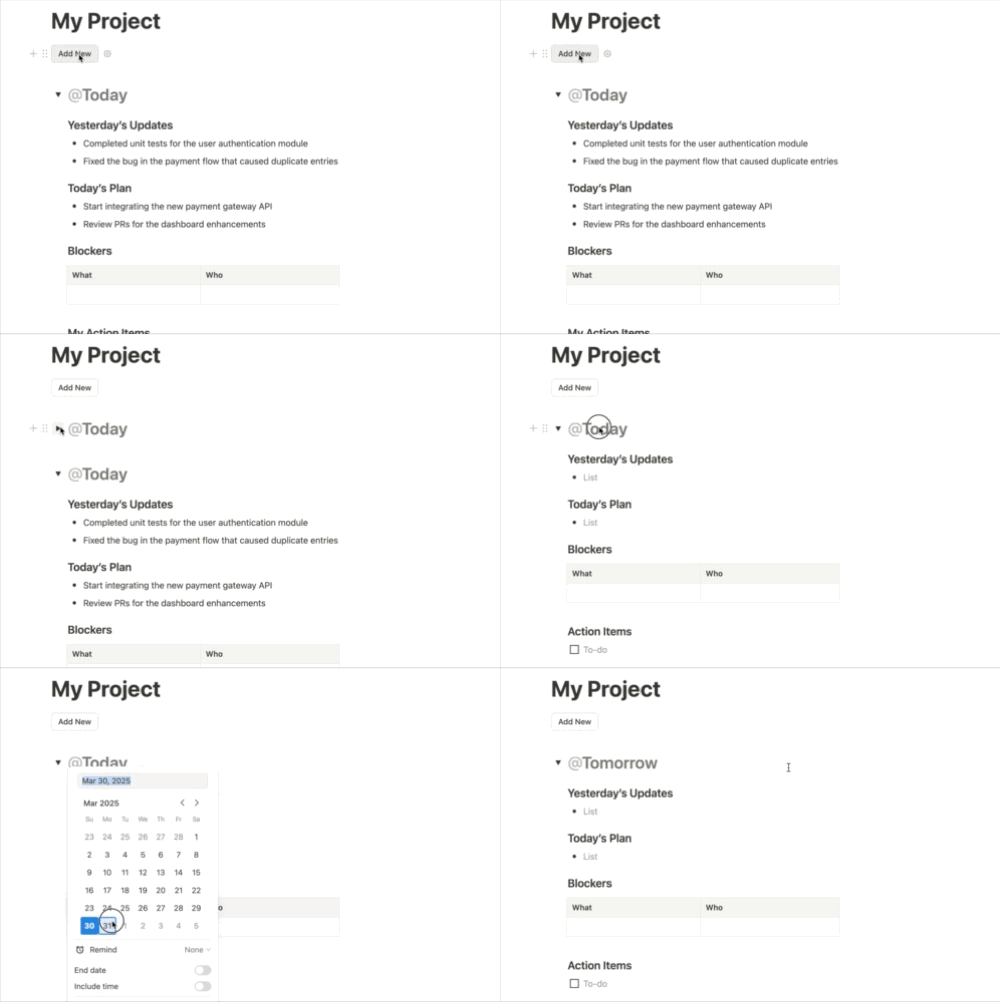
Template button for daily entry to make your standup updates easier
At the top of the page, I have a button that adds a new daily entry, usually with tomorrow’s date, as it is meant for the next day’s standup. I create each entry at the end of the workday, and refer to it the following morning.
The format is simple and consistent, focused only on updates relevant to that project. Over time, these entries also help with sprint reviews and annual self-assessments.
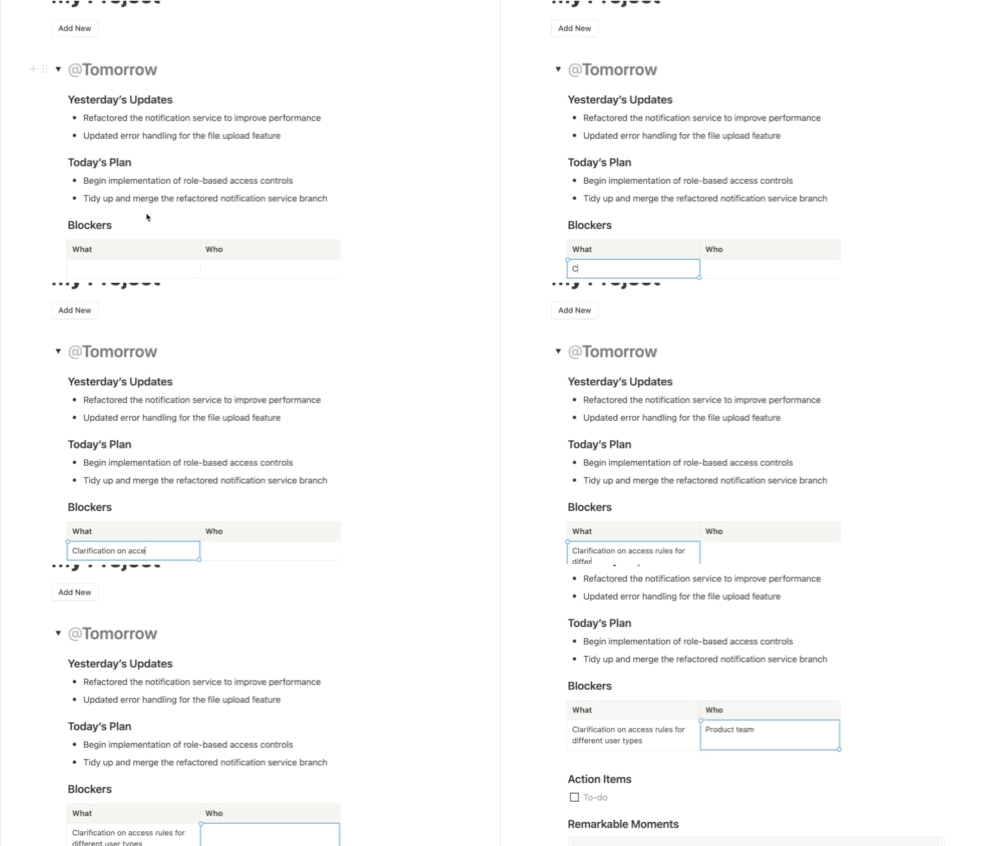
Add Yesterday’s Updates, Today’s Plan and Blockers to follow standard DSU format
1. Yesterday’s Updates
Since I make the entry at the end of the day, this section reflects the work I completed today. I usually copy the previous entry’s Today’s Plan section and update it, moving any unfinished tasks and adding notes about what actually got done. This saves time and ensures continuity from day to day.
2. Today’s Plan
This is a short, clear summary of what I intend to work on tomorrow. I move over any unfinished tasks from the current day’s plan and include new ones. These two sections effectively become a short script for the next morning’s standup.
3. Blockers
If anything is preventing progress, I add a brief note here, ideally with who or what I need to resolve it. This section is helpful for bringing up questions I need to raise during or after standup, and often prompts a follow-up chat to clarify things.
4. Action Items (Private)
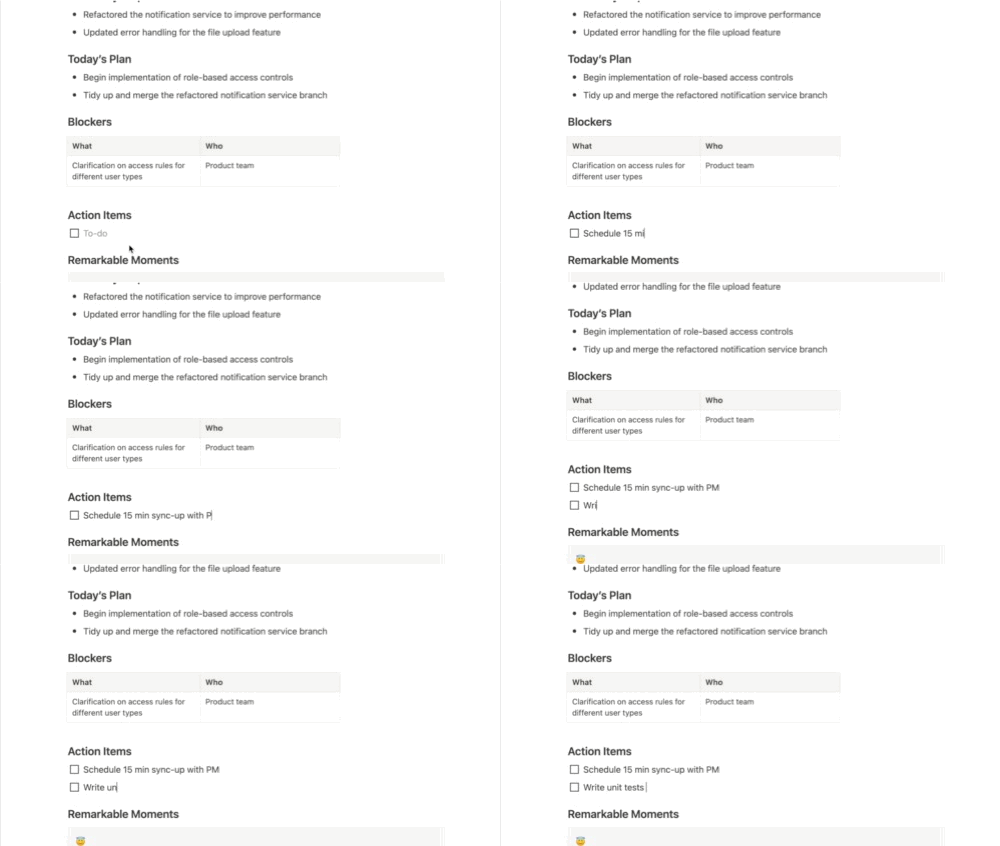
A lightweight, easy-to-maintain to-do list for action items
This section is for personal tracking. I break down tasks from Today’s Plan into smaller, manageable steps, like a lightweight to-do list. It makes it easier to write accurate updates later, without switching tools. If you already maintain a to-do list elsewhere, consider combining your DSU tracking with it for simplicity.
5. Remarkable Moments (For long-term use)
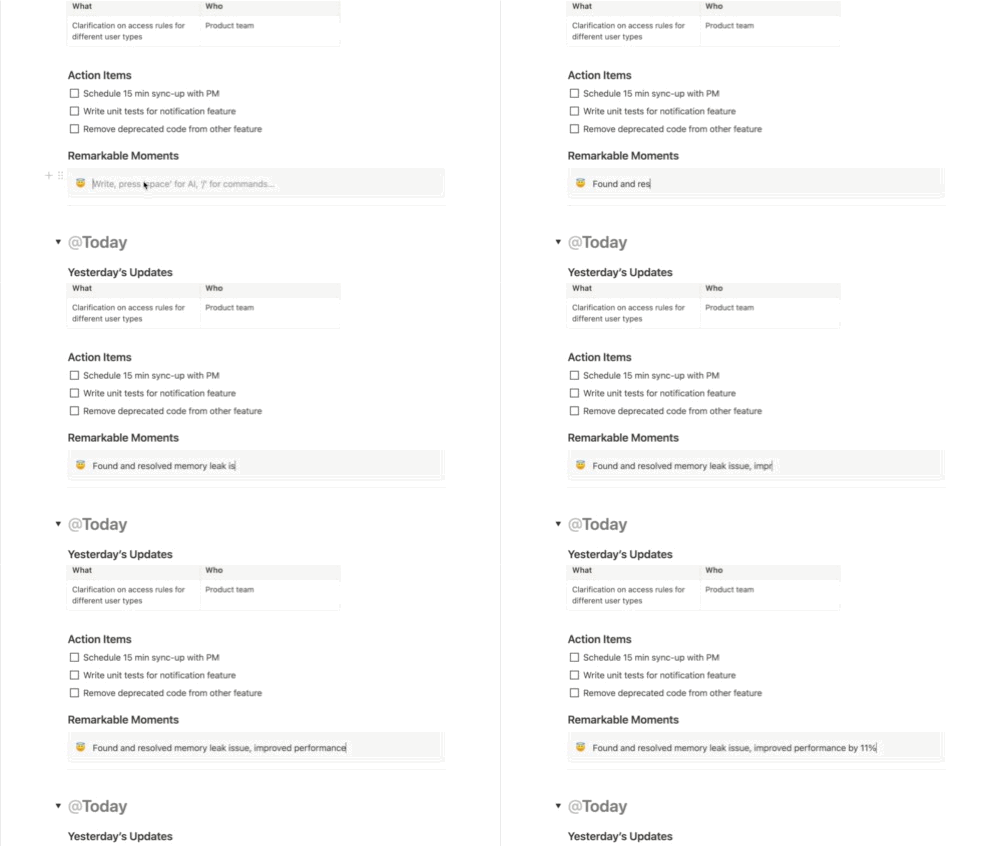
Did something noteworthy? Note down anything worth remembering
If I complete something noteworthy, whether it’s a tricky bug, a performance improvement, or a helpful code review, I jot it down here. It’s not shared in standups, but extremely useful for retrospectives and annual reviews. Logging these wins daily helps capture impact that would otherwise be forgotten.
Why This System Works
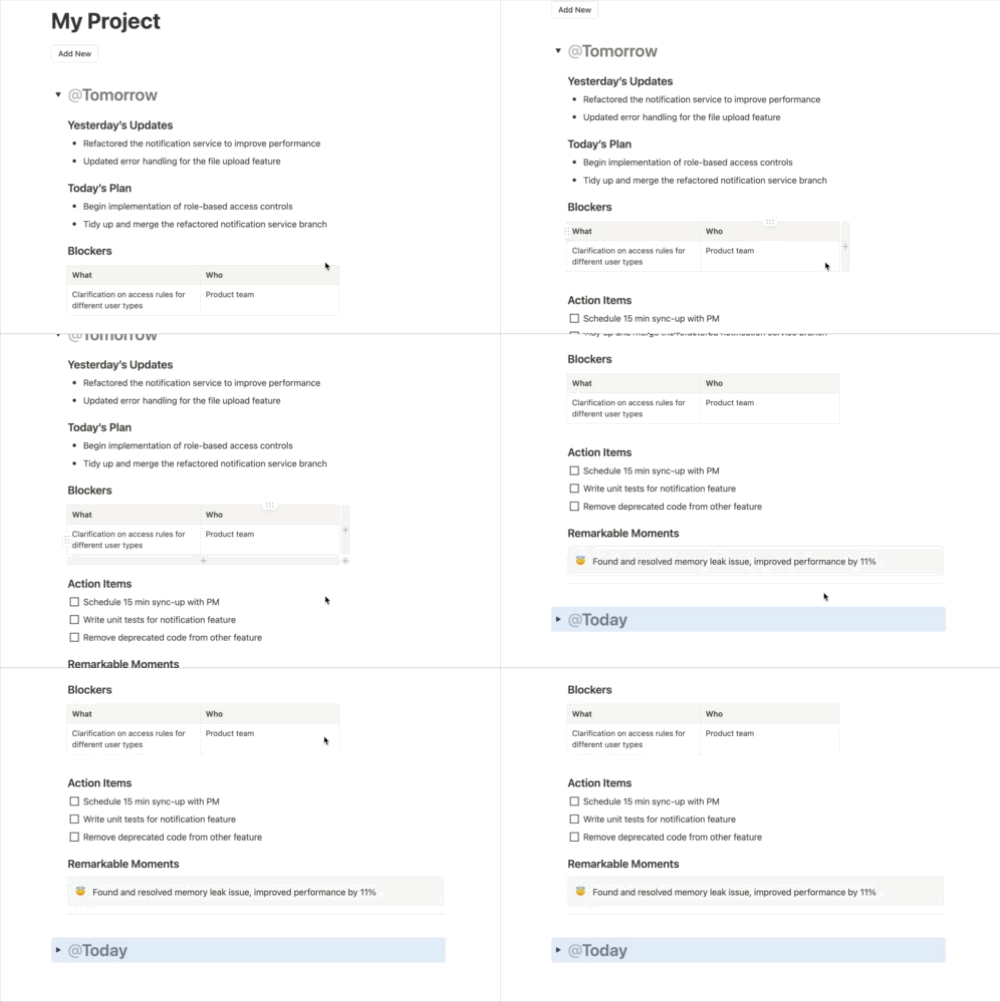
Tomorrow’s update ready within minutes
This tracker works because it fits neatly into my workflow. Logging updates at the end of the day means I’m not relying on memory the next morning. There’s no need to scroll through JIRA or retrace Slack threads; everything is already written down.
It’s also low-effort. The template button saves time, and using the same format each day keeps the entries clean and consistent. Because each Notion page is scoped to a single project or sprint, the updates stay relevant without being cluttered by unrelated work.
The Remarkable Moments section has been particularly valuable for performance reviews. Logging even one line a day gives me a reliable reference when I need to highlight accomplishments later.
Most importantly, this system doesn’t feel like “extra work.” It blends in with the daily activities, so it’s easy to maintain and becomes a natural part of my day.
How to Make Your Own
Creating this in Notion is simple, and once set up, it only takes a click to generate a new entry. You could find and customise an existing Notion template for Daily Stand-Ups or you could make your own. If you’re already using Notion for project work, you can build something similar in minutes. I use a template button to create a new log each day, pre-filled with the sections I update daily.
Here’s what my setup includes:
-
A template button that adds a new entry
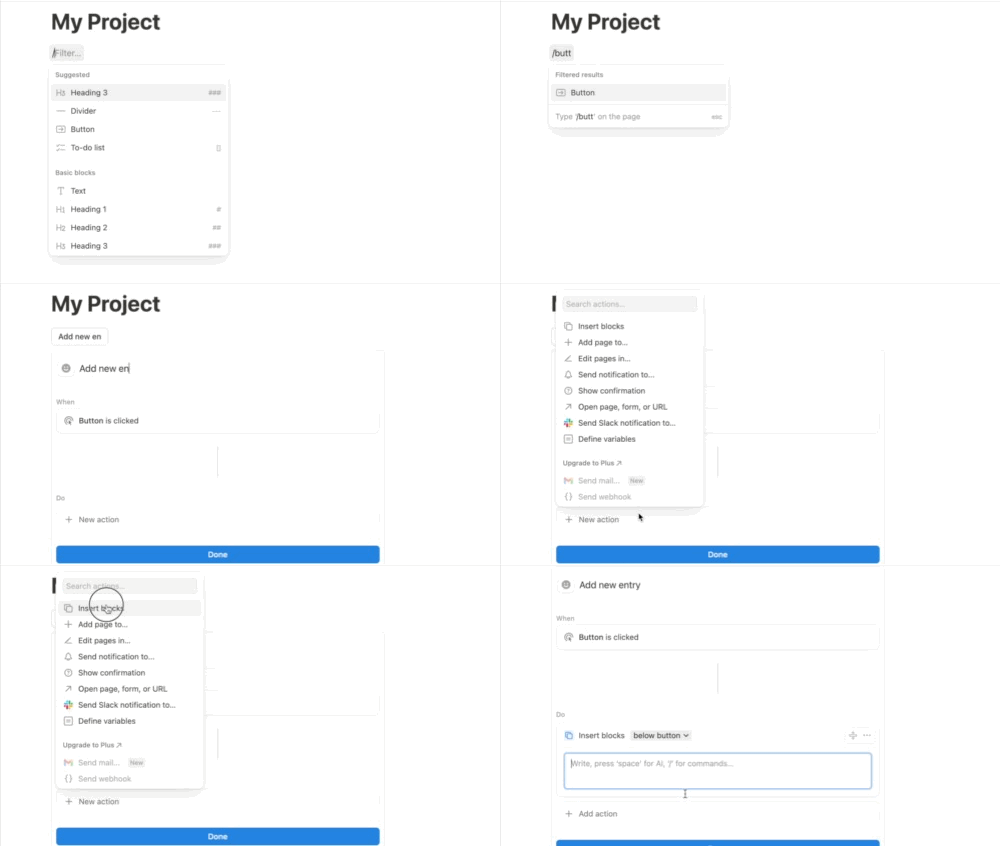
-
The default title of the entry is the current date of the entry creation
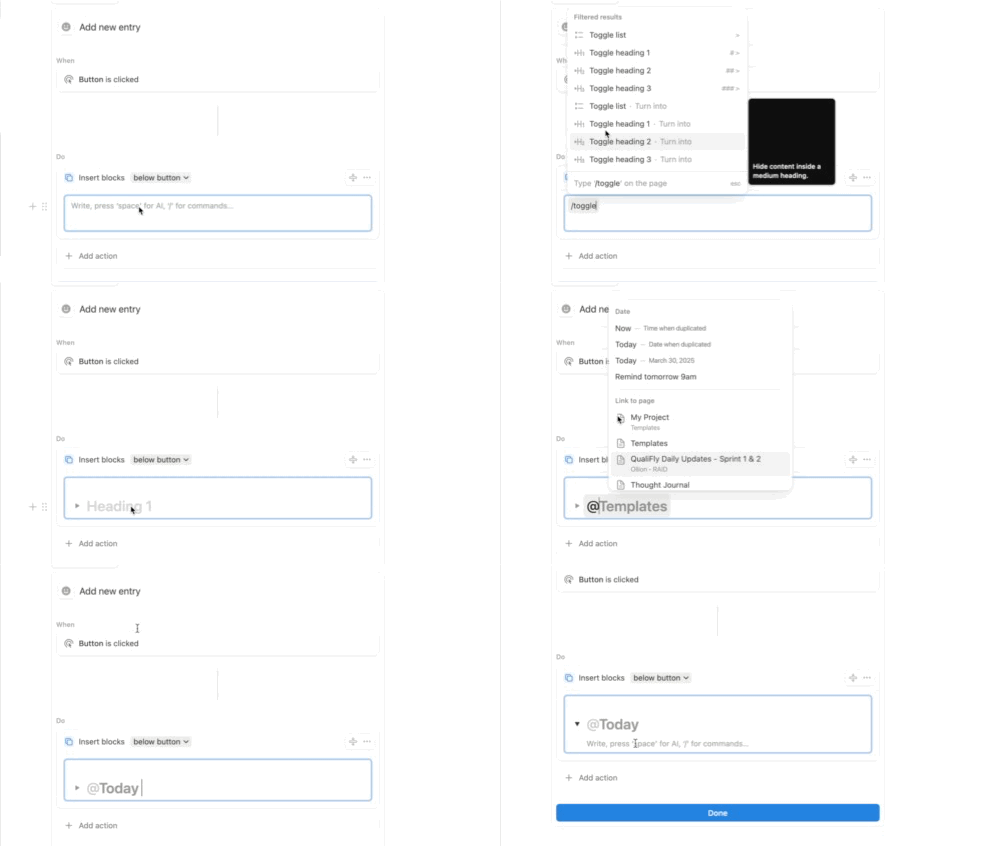
-
The following sections inside the template:
- Yesterday’s Updates
- Today’s Plan
- Blockers
- Action Items
- Remarkable Moments
You can replicate this exactly or adapt it to your own style.
Final Thoughts
This isn’t a complex productivity system, and it doesn’t need to be. The combination of a simple logging habit and a reusable Notion template has made my daily updates smoother, more consistent, and less mentally taxing, especially on Mondays. You can recreate this with any tool that you’re already using for work. What matters isn’t the tool; it’s having a habit that fits into your day and actually sticks.